 |
| White Apps Problem |
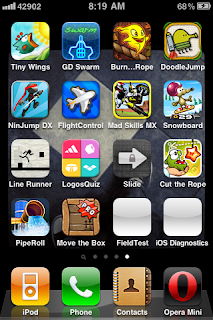
I got this strange problem on my jailbroken iPhone 3G (iOS 4.2.1) after updating my apps from the app store. Some white apps/icons appeared automatically. The apps were FieldTest, iOS Diagnostics and AdSheet. You cannot delete these apps by the default method. The problem is due to libhide a thing that lets you hide icons.
There are two ways to solve this problem:
- By doing a Hard Reset. To do a hard reset press the Sleep/Wake and Home button for sometime until the Apple logo appears on the screen.
(Note: This method solves 80% of the iPhone Problems!)
- Update libhide via. Cydia and then open SBSettings and click "More", "Mobile Substrate Addons" make sure libhide is toggled on. After this hard reset your iPhone for the changes to take place.
This will help you to get rid of those unknown white apps from your device. Enjoy!
 If you have jailbroken your iPhone 3G or iPod 2G device to iOS 4.2.1 and experiencing SpringBoard restart while switching between applications (multitasking) ?
In order to stop your SpringBoard from restarting you need to follow some simple steps. There are lots of ways to do this but this one is definitely the easy one that I've found till now.
- Download iFile from Cydia.
- Goto: System/Library/Coreservices/Springboard.app then edit N82AP.plist for iPhone 3G and N72AP.plist for iPod 2G.
- Change the line < key > opengles-1 < / key > to: < key > opengles-2 < / key >. (i.e. only change the integer : 1 to 2)
- Restart your device.
The problem should be gone now. Enjoy!



