Showing posts with label Windows. Show all posts

Monday, August 27, 2012

Delete Your Skype Username From Skype Login

If you use Skype with different accounts then you must have noticed that Skype remembers all the usernames that you have logged in. The login screen has all the list of usernames. So, if you want to stop the names showing up in the login screen for some reason then follow these steps:

For Windows Users:
  • Quit Skype if running, open Run.
  • Type in %AppData%/Skype, hit Enter.
  • Then, delete the folder with your Skype username.

For Linux Users:
  • Quit Skype if running.
  • Go to the folder: /home/YOURLINUXUSERNAME/.Skype
  • Then, delete the folder with your Skype username.
Done !

Sunday, July 15, 2012

Delete System Folder Trace Left in My Computer by Nokia PC Suite or Sony Ericsson PC Suite

If you are getting a strange system folder in the others category of My Computer. This is due to any 3rd Party Applications like Sony Ericsson PC Suite or Nokia PC Suite. This normally happens after you uninstall the product. Thus, to  remove this system folder you need to do a registry edit.
Goto the following path in regedit and delete the unwanted folder with a random name:
HKEY_LOCAL_MACHINE\SOFTWARE\Microsoft\Windows\CurrentVersion\Explorer\MyComputer\NameSpace

If this doesn't solve your problem then re-install the PC Suite and then remove it by using Revo Unistaller Pro.

Cheers !!!

Friday, June 8, 2012

Blue Screen : Dell XPS L502X Solution

Blue Screen of Death
My laptop is Dell XPS L502x and I was having this Blue Screen (BSOD) problem some days back showing some MEMORY_MANAGEMENT problem. I did a memory check with Windows 7 but it showed everything was fine. Thus, after some research I found that the problem would occur if any of the Hardware or Software(Drivers or Anti-Virus or Bios) was not working properly. Thus, after knowing this I did a hardware check with Dell Support Center but it too didn't show any problem with the hardware.

Then through the Dell Drivers website I downloaded the latest update to the BIOS (i.e. L502XA10) and to my surprise I haven't seen the blue screen for quite a while.

The problem is also sometimes due to Intel Wireless Driver. So, please update your wireless driver from http://www.intel.com/p/en_US/support/detect.

After the blue screen crash windows makes a copy of the dump file in C:\Windows\Minidump. So, in order to read such dump files to extract information from it you need to download the Windows Debugger tool from:
http://msdn.microsoft.com/en-us/windows/hardware/gg463009.aspx

This tool helps to know your problem and solve your problem.
Hope this helps.

Friday, April 6, 2012

Run Any Game In Windowed Mode Using DXWND

Well, if you are trying to run any games like FIFA12 in windowed mode and have been trying to edit the .ini files and make it work with no success. Then, here is a method to do so. This method works for most games that I've tried so far. Results will vary depending on how your DirectX application was written.

The task is pretty simple. Just download DXWND - MS tool from here. Found this tool on the web, pretty useful.

Now to go ahead with the process:
1. Extract the zip and open dxwnd.exe (Some anti-virus software may take this as a threat so make a exception of the extracted folder.)
2. Select Add in the Edit tab.
3. Now, add the path of the executable file.
4. Then select the path of the required game that you've added and Execute it from the Edit Tab.

This should do the job. Enjoy, for more information you can go through the readme. Enjoy!

Friday, March 23, 2012

Remove Grub As Your Boot Loader (Switch To Windows Boot Loader)

Have you ever installed Linux operating systems such as Ubuntu alongside Windows (Not Inside Windows) then you may have found that the boot is different than the normal Windows boot after you have installed the Linux. This is because your main boot loader is set to GRUB instead of the Windows Boot Loader.


Now, if you want to get rid of Ubuntu for instance, then you need to remove the GRUB first. Thus, to remove the GRUB I have found a lot of solutions on the web and tried many of them but the most simple and less time consuming is the with an executable file called mbrfix.exe for Windows.


Here are the steps:
  1. Download the mbrfix from here. (Zip file with instructions)
  2. Extract all the mbrfix.zip to C:\.
  3. Open the command prompt. (Run as administrator)
  4. Type cd \ to goto the root directory.
  5. Then type mbrfix /drive 0 fixmbr /yes and press Enter.
  6. Now you can delete the Ubuntu partitions using any partition editors.
  7. Restart your PC.
You're done. This process will overwrite the GRUB with Windows Boot Loader. When you reboot the PC you'll see Windows Boot Loader instead of GRUB Loader.

Enjoy!!!

Tuesday, January 10, 2012

Windows 7 - PC Resumes Automatically When Hibernated (Solution)

I use my PC many times a day. So, I usually hibernate it when there is no work to be done. Yesterday, I came across this strange problem. My PC got automatically resumed after I hibernated it. I tried to hibernate it again but once again the same thing happened. This left me stranded so I had to shutdown my computer.

Thursday, December 22, 2011

Portable Apps - Your Favorite Apps On The Go

If you want to take your favorite applications with you then PortableApps.com is the best software for you to do so. It is completely free and works on any portable storage device so to speak. It is a very lightweight (6MB installed), handy tool to use and has a support of almost all the usual open source software and some compatible freewares.Simply, make every PC feel like your own.

LibreOffice - The Best Open Source Office Suite Available

LibreOffice is a office suite available for Linux, Windows and Mac OS X. It has quickly become a mainstream office suite for Linux users and is still growing, it is available in Ubuntu as a default. It has replaced Open Office at the top of the open source office suites available. It is very simple to use and also has a lot of functions with minimal system requirements. It is not as great Microsoft Office but is worth using as it comes for free and yet powerful too. It is compatible with most of all file formats. It can also be useful to edit PDF's which is a bonus. It also has a fully featured portable version packaged as a portable app so that you can take every documents you have on the go and play with them.

Thursday, November 24, 2011

IrfanView - Lightweight, Compact and Innovative Graphic Viewer For Windows

Many of you may already have heard of IrfanView and also used it. It is a freeware/shareware Graphic Viewer for Windows. It is known for the ability to handle a large variety of graphic file formats with some image creation capabilities. It works under Windows and can also be run in Linux under Wine. 

The program is compact and just occupies 2 MB(approx.), and with all plugins installed occupies about 10 MB(approx.). IrfanView can create icons, screensaver and do many more such operations such as image editing. Batch processing is one of the most important operations included in IrfanView. The program is also available in more than 20 languages.

The IrfanView team quotes it's program as:
"It is designed to be simple for beginners and powerful for professionals."

Official Website: http://www.irfanview.com/ 


Sunday, October 30, 2011

VirtualDub - Opensource Video Capture/Processing Utility for Windows

VirtualDub is a video capture/processing utility for Windows platform. It is a very useful, powerful and lightweight utility for processing linear video streams, including filtering and re-compression. This tool is very useful to compress large videos and also for quick capture and encoding. Different plugin filters further extend VirtualDub's capabilities. 

Monday, September 5, 2011

File Extensions Registry


FileInfo.com

Well, I was wanting to know about a strange file type or file extension (suffix at the end of the file name) residing on my computer. I couldn't figure out the extension of the file and was left disappointed. Thus, I came across this pretty useful website FileInfo.com which contains a searchable database of thousands of file extensions with detailed information about the associated file types which they call as the "File Extension Registry".

Nonetheless, the coolest thing about this website is we can easily register our own file extensions. Thus, developers can submit their file extensions along with its information.

Official Website: FileInfo.com - The Central File Extensions Registry:

'via Blog this'

Wednesday, August 24, 2011

Disable Autorun of All Drives In Windows

The Autorun or Autoplay feature is enabled in Windows by default. Thus, CDs, DVDs & Flash Drives containing viruses or malwares make use of the Autorun feature in Windows to infect your computer as soon as they are loaded into your PC, Laptops. If you want to avoid all possible means of your computer being infected by viruses then disabling Autorun feature is the first step of them all.

Note: The operating system vulnerable to most of the viruses is WINDOWS.

Here are the simple steps to disable Autorun in Windows:

Go to Start, Click Run type gpedit.msc (Windows Group Policy) and click OK.

Now in the Group Policy, click Adminsitrative Templates under Computer Configuration.

For Windows XP click on System.

For Windows 7 & Vista, click on System Components, then Autoplay Policies.

Double click on Turn Off Autoplay in the Right Hand Side.


Now in Turn Off Autoplay Properties, select Enable & then select All Drives in the drop down. Click Apply and then OK.

Turn off Autoplay Properties.


You're done. Good Luck!

Friday, August 19, 2011

Greenshot - A Free and Open Source Screenshot Tool

Greenshot is probably the best screenshot tool you'll find for free. It is an open source and lightweight software for Windows with simple and easy to understand features. You can easily capture partial and complete screenshots within a second. Take screenshots - upload it to your blog, show it to your friends, enjoy!

Sunday, July 31, 2011

All-In-One Utility For Windows - Glary Utilities (Freeware)

This free utility offers numerous powerful and easy-to-use system tools and utilities to fix, speed up, maintain and protect your PC. It allows you to clean common system junk files, as well as invalid registry entries and Internet traces. You can analyze disk space usage and find duplicate files.

Thursday, July 28, 2011

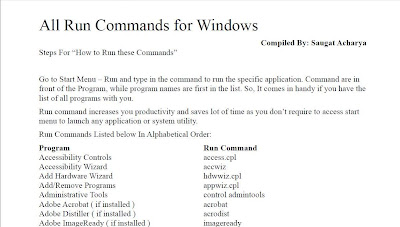
All RUN Commands For Windows


Here is a list of all RUN Commands for Windows. To download the PDF please follow the link.

Tuesday, July 26, 2011

Lyrics Player - MiniLyrics

Well, if you have been looking for a Lyrics Player.. then here it is. MiniLyrics is a lyrics plugin player which automatically searches for lyrics on the web,downloads it automatically when you play a song from your music player. It comes with lyrics scroll option so that you can follow along with the artist and catch every word of the song.

Saturday, July 9, 2011

CleanUp! - Delete Unwanted Temporary Files From Windows


CleanUp! is a application for Windows that removes temporary files created while surfing the web, empties the Recycle Bin, deletes files from your temporary folders and more.

Learn More From It's Official Website:

 CleanUp! Official Website

Very easy to use and powerful tool.

Peace !

Thursday, June 23, 2011

Mp3 Cover Downloader (freeware)

A very small software to easily find and add Album Arts(covers) for your Mp3's.
More on this software from it's website:
Creevity Software - Mp3 Cover Downloader (freeware)

It comes with a friendly and intuitive interface and is really smart.
Enjoy!!

Creevity Mp3 Cover Downloader Screenshot

Wednesday, June 22, 2011

Prime95 - EXTREME Overclocking and Torture To Your CPU

If you think running your favorite game is a good stress of your CPU, you're wrong. Games are only good for testing GPU. If you want to squeeze your CPU hard then use Prime95.

Tuesday, June 21, 2011

Disguise Facebook As A Spreadsheet

Excellbook is a desktop application available for both Macs and PCs, that makes Facebook like a spreadsheet connecting you to your world with being caught. Download it, install it, and connect it to your Facebook account.